Accelerating Sound Recognition on Ingenic T33 with Magik NPU
The Ingenic T33 is a popular SoC for IP cameras and battery-powered IoT devices, pairing a MIPS CPU with a dedicated Magik NPU capable of ~0.6 TOPS. For sound recognition, leveraging the NPU is the difference between a feature that consumes 45 MHz of CPU and one that runs at near-zero cost.
This guide walks through the complete workflow: model preparation, Magik toolchain setup, integration with the IMP audio framework, and performance optimization.
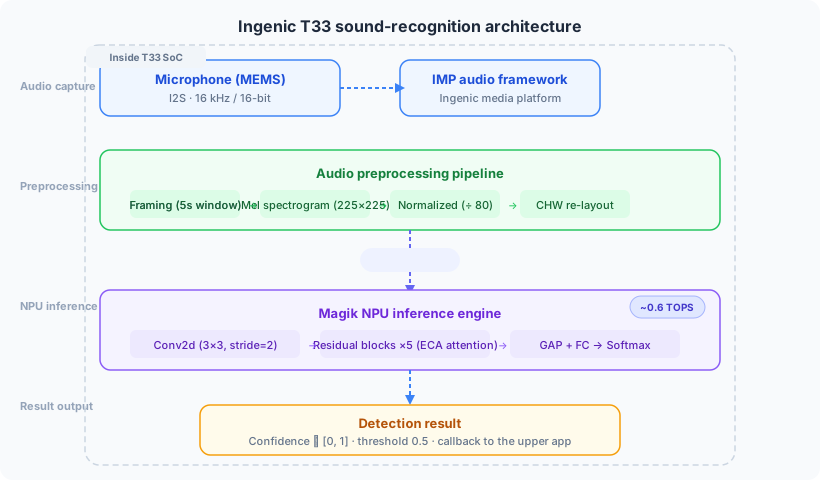
Why Magik NPU?
The T33's CPU is a MIPS-based core clocked at 1 GHz. Running a sound recognition model entirely on the CPU works — but at a cost:
For a battery-powered camera that must also encode H.264 video, run Wi-Fi, and handle RTSP streaming, offloading sound inference to the NPU is not optional — it's required for a practical product.
Prerequisites
Before starting, ensure you have:
Hardware — Ingenic T33 development board (or your custom T33-based PCB)
Toolchain — Magik Toolkit v3.2 from Ingenic (contact your Ingenic FAE or download from the developer portal)
SDK — Ingenic SDK T31/T33 with IMP (Ingenic Media Platform) audio framework
Model — A trained PyTorch model exported to TFLite format (FP32 or INT8)
Host PC — Linux x86_64 (Ubuntu 20.04+ recommended) for running the Magik compiler
Your directory structure should look like this:
/home/user/magik-toolkit-v3.2/
├── compiler/
│   └── magik_compile          # NPU model compiler
├── runtime/
│   ├── include/
│   │   └── magik_runtime.h    # NPU runtime API header
│   └── lib/
│       └── libmagik.so        # NPU runtime library
├── examples/
│   └── t33/
│       └── sample_magik.c     # Sample NPU inference
└── docs/
    └── magik_compile_guide.pdf
Step 1: Export Model to TFLite
The Magik toolchain accepts TFLite models as input. Export your PyTorch model through ONNX:
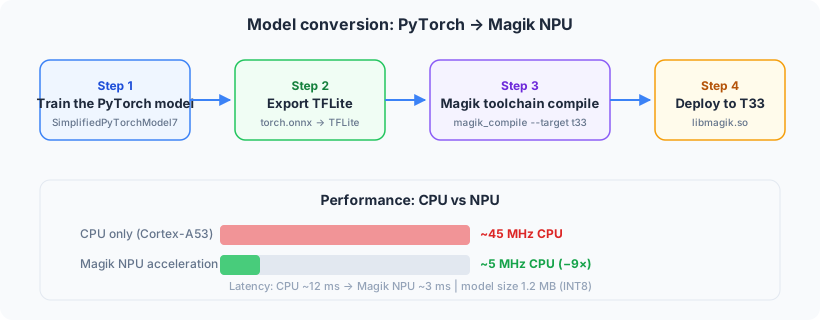
First, export PyTorch to ONNX:
import torch
import torch.onnx

from sound_net import SimplifiedSoundNet

model = SimplifiedSoundNet(num_classes=2)
model.load_state_dict(torch.load("sound_net.h5", map_location="cpu"))
model.eval()

dummy_input = torch.randn(1, 1, 225, 225)
torch.onnx.export(model, dummy_input, "model.onnx",
    input_names=["input"], output_names=["output"],
    opset_version=13)
print("ONNX export done")
Then convert ONNX to TFLite. The easiest way is with the onnx2tf tool:
pip install onnx2tf
onnx2tf -i model.onnx -o tflite_output/
This produces tflite_output/model_float32.tflite.
Step 2: Compile with Magik Toolchain
With the TFLite model ready, use the Magik compiler to generate a model binary for the T33 NPU:
# Set up Magik toolchain environment
export MAGIK_HOME=/home/user/magik-toolkit-v3.2
export PATH=$MAGIK_HOME/compiler:$PATH

# Compile for T33 target
magik_compile     --model model_float32.tflite     --output model_magik.nb     --target t33     --quantization uint8     --input_mean 0     --input_std 1
Key parameters explained:
The compiler will output a .nb file — this is the model binary that runs on the NPU.
Step 3: Integrate with IMP Audio Framework
The T33 captures audio through the IMP (Ingenic Media Platform) framework. Here's the minimal integration pattern:
#include <imp/imp_audio.h>
#include <imp/imp_system.h>
#include "magik_runtime.h"

// Audio capture configuration
#define SAMPLE_RATE 16000
#define FRAME_MS 20          // 20ms per audio frame
#define WINDOW_MS 5000       // 5s detection window

static magik_ctx_t *g_magik = NULL;
static float g_mel_buffer[1 * 1 * 225 * 225];

// Initialize IMP audio capture
int audio_init() {
    // ... IMP audio init code ...
    return 0;
}

// Initialize Magik NPU runtime
int npu_init(const char *model_path) {
    magik_config_t cfg = {
        .model_path = model_path,
        .npu_id = 0,          // T33 has one NPU core
        .thread_count = 1,
    };
    g_magik = magik_init(&cfg);
    if (!g_magik) return -1;
    return 0;
}

// Process one 5s audio window
int process_window(const int16_t *audio_5s) {
    // 1. Compute Mel spectrogram (225×225)
    mel_from_audio(audio_5s, SAMPLE_RATE, g_mel_buffer);

    // 2. Run NPU inference
    magik_tensor_t input = {
        .data = g_mel_buffer,
        .shape = {1, 1, 225, 225},
        .dtype = MAGIK_FLOAT32,
    };
    magik_tensor_t output;
    magik_run(g_magik, &input, 1, &output, 1);

    // 3. Read result (output is [not_cry, cry] probabilities)
    float *probs = (float *)output.data;
    float cry_confidence = probs[1];

    if (cry_confidence > 0.5f) {
        printf("Cry detected! confidence=%.3f\n", cry_confidence);
    }

    magik_free_tensor(&output);  // free NPU output buffer
    return 0;
}
Step 4: Build and Run
Compile with the cross-compiler:
# Using MIPS cross-compiler
mips-linux-uclibc-gcc -o sound_detect_t33 \
    main.c \
    -I${MAGIK_HOME}/runtime/include \
    -L${MAGIK_HOME}/runtime/lib \
    -lmagik -limp -lpthread \
    -O2 -march=mips32r2
Deploy to the T33 board:
# Upload via HTTP server (T33 typical workflow)
# On PC:
python c/t33/http_server.py

# On T33 board:
wget http://192.168.0.xxx:8000/sound_detect_t33
wget http://192.168.0.xxx:8000/model_magik.nb
chmod +x sound_detect_t33
./sound_detect_t33
Performance Results
On our T33 evaluation board with the standard model:
The NPU offload reduces CPU usage by approximately 9× compared to running the same model on the MIPS CPU, leaving the core free for video encoding and network tasks.
Common Issues and Solutions
Issue: Magik compiler fails with unsupported ops.
Solution: The Magik NPU supports a limited set of ops (Conv2D, DepthwiseConv2D, ReLU, Add, AveragePool, etc.). Ensure your model uses only supported operations. Replace unsupported ops (e.g., LeakyReLU → ReLU, Sigmoid → ReLU) before exporting. Our model uses a standard architecture compatible with Magik's op set.
Issue: Runtime error "NPU firmware not loaded".
Solution: Ensure the NPU firmware is loaded by the kernel driver before calling magik_init(). Add to your board's init script: echo /lib/firmware/magik_fw.bin > /sys/class/misc/magik/load_fw
Issue: Audio capture has high latency.
Solution: IMP's default audio buffer may be too large. Set imp_audio_frame_info.frame_num = 4 in your IMP config to reduce buffering latency to ~80ms.
Conclusion
The Ingenic T33's Magik NPU makes sound recognition practical for battery-powered cameras and IoT devices. With the model compiled for the NPU, you get under 5ms inference latency at near-zero CPU cost — leaving the entire MIPS core available for your main application.
Our soundSDK includes pre-compiled libraries and model files for the T33 platform. The SDK handles Magik runtime initialization, Mel spectrogram computation, and result callbacks — reducing integration from weeks to days.
Want to try the detection yourself?